How the decks work
The five decks of a level, every part of a card and how updates work, one screen at a time. To import your deck and study your first card, start with Get started.
The pictures show the A1 level as an example. Every level has the same five decks and the same card layout, so everything shown here applies to every level.
The five decks
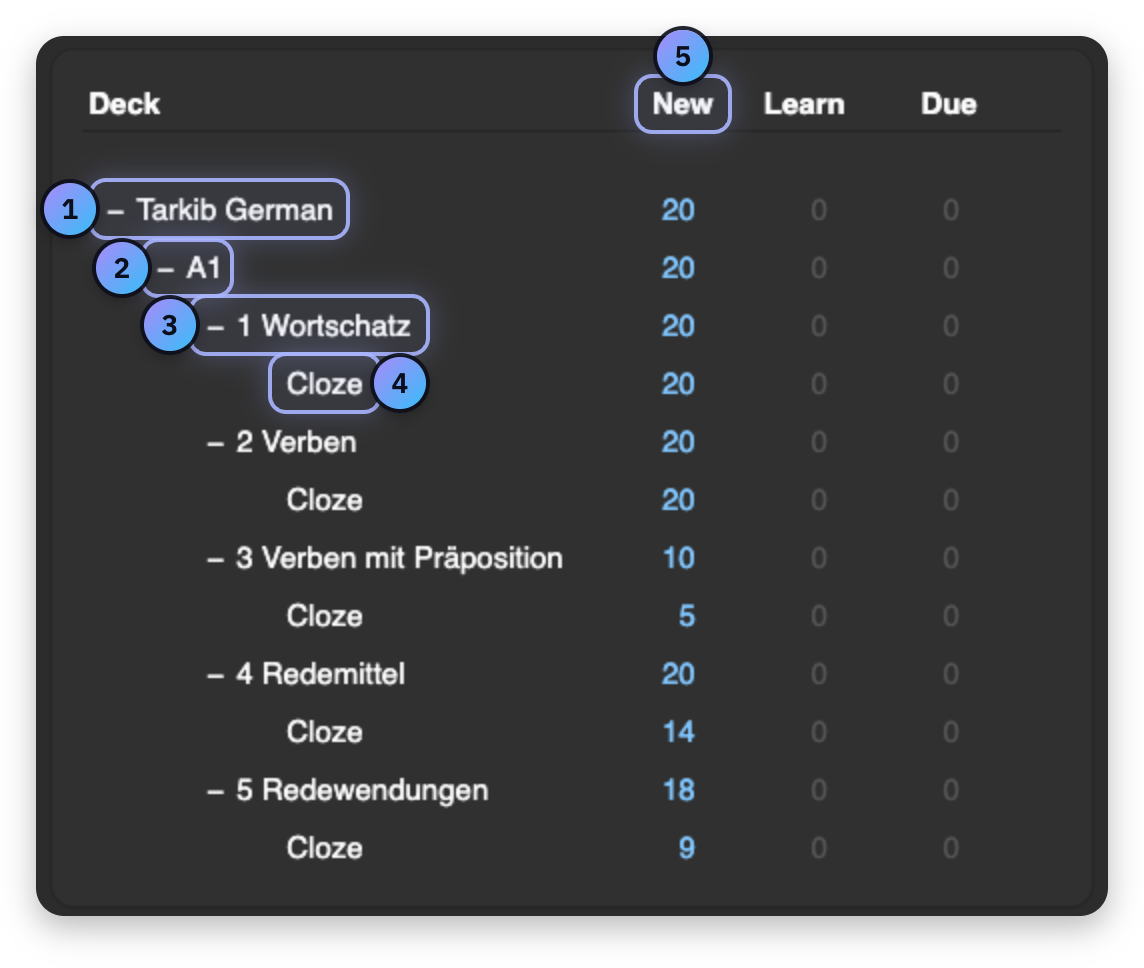
- Tarkib German All your levels, together in one place.
- Your level Click it to study the whole level: new cards come one deck at a time, starting with 1 Wortschatz.
- One of the five decks Every level has the same five: 1 Wortschatz for words, 2 Verben for verbs, 3 Verben mit Präposition for a verb with its preposition and case, 4 Redemittel for set phrases and 5 Redewendungen for fixed expressions and idioms. Click one to study only that deck.
- Cloze The typing cards that go with the deck above it.
- New How many new cards Anki shows you today. It starts at 20 a day, and you can change that in the deck's options.
A word card, part by part
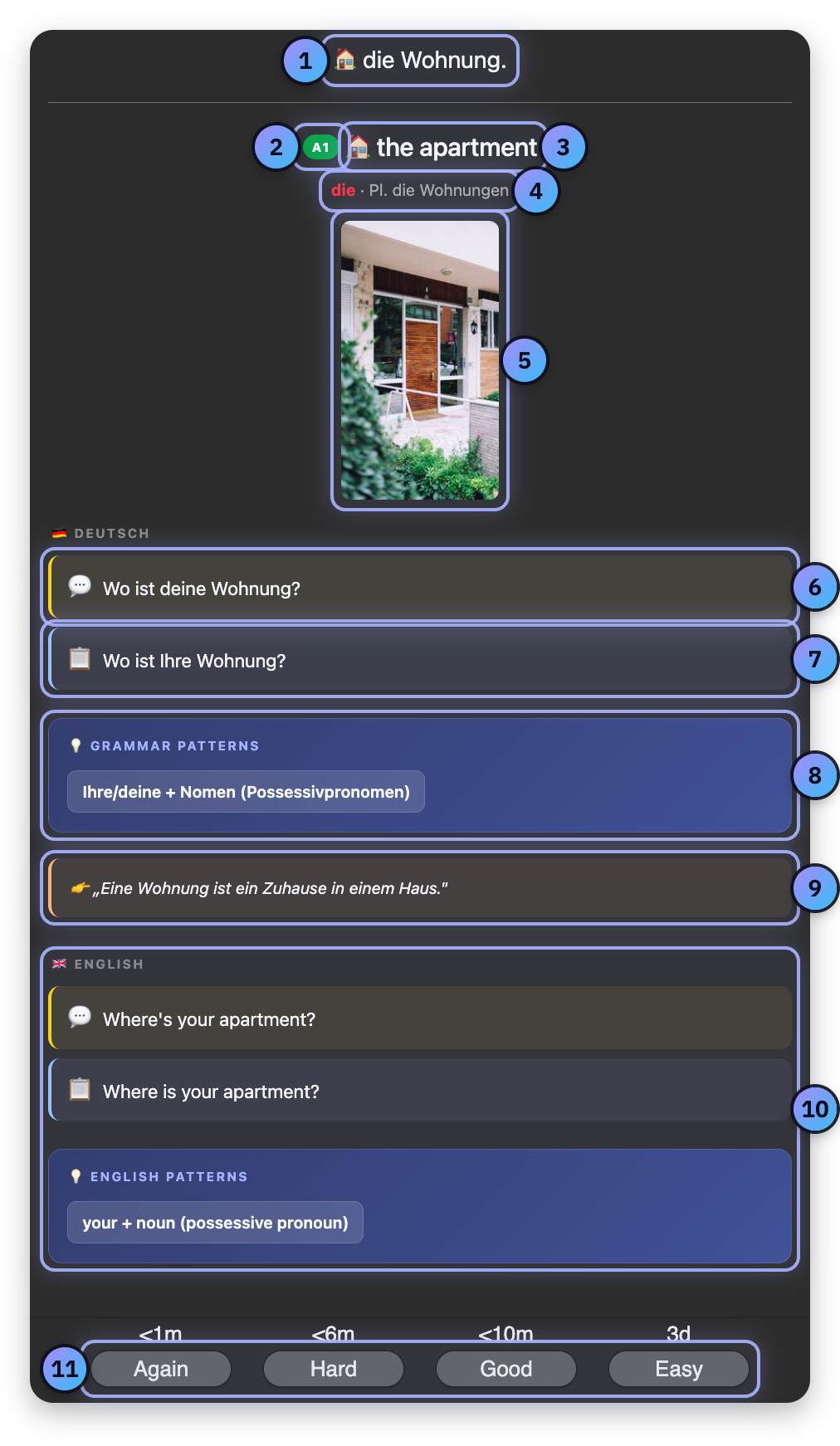
- The German word The front of the card shows only this. Think of the meaning, then click Show Answer.
- Level The level of the word, from A1 to C1.
- Meaning What the word means in your language.
- Article and plural The article in colour, der blue, die red and das green, the plural when there is one and, from B1 on, the genitive. A verb shows its forms here instead.
- Picture A photo of the word or of its sentence.
- Casual sentence The yellow line: how you would say it to a friend, often with du.
- Formal sentence The blue line: the polite way, often with Sie, for an office or someone you do not know.
- Grammar patterns The grammar inside the two sentences, with the case where it matters.
- Explanation The meaning, explained in simple German.
- In your language Both sentences in English, and the grammar patterns explained in English.
- How well you knew it Again, Hard, Good or Easy. Anki uses your answer to decide when you see the card again.
A verb card
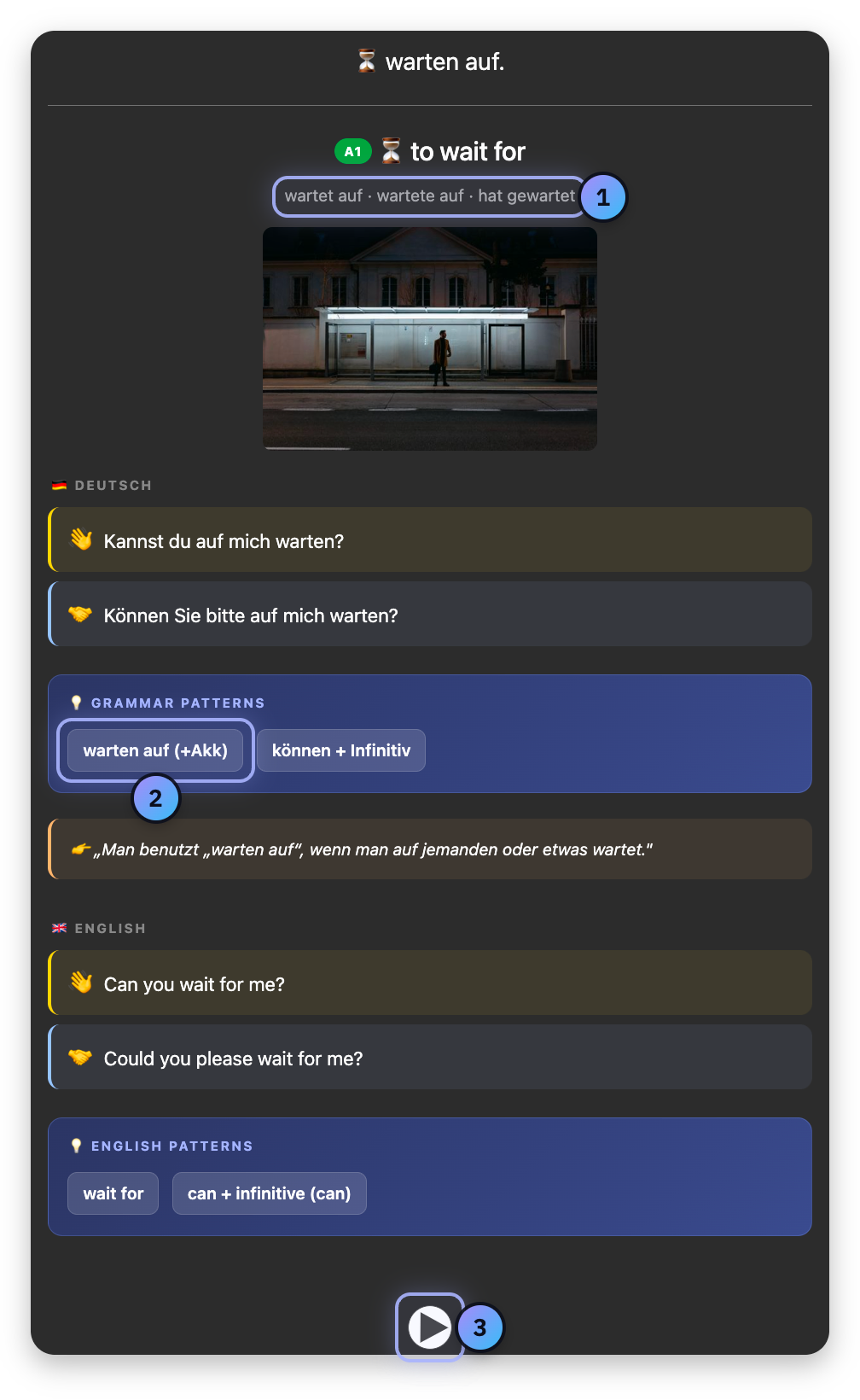
- Verb forms The he or she form now, in the past and in the perfect, and trennbar when the verb is separable.
- Preposition and case The preposition that goes with the verb, and the case it takes.
- Sound Plays the German word and both sentences. Anki plays them by itself when you show the answer.
A typing card
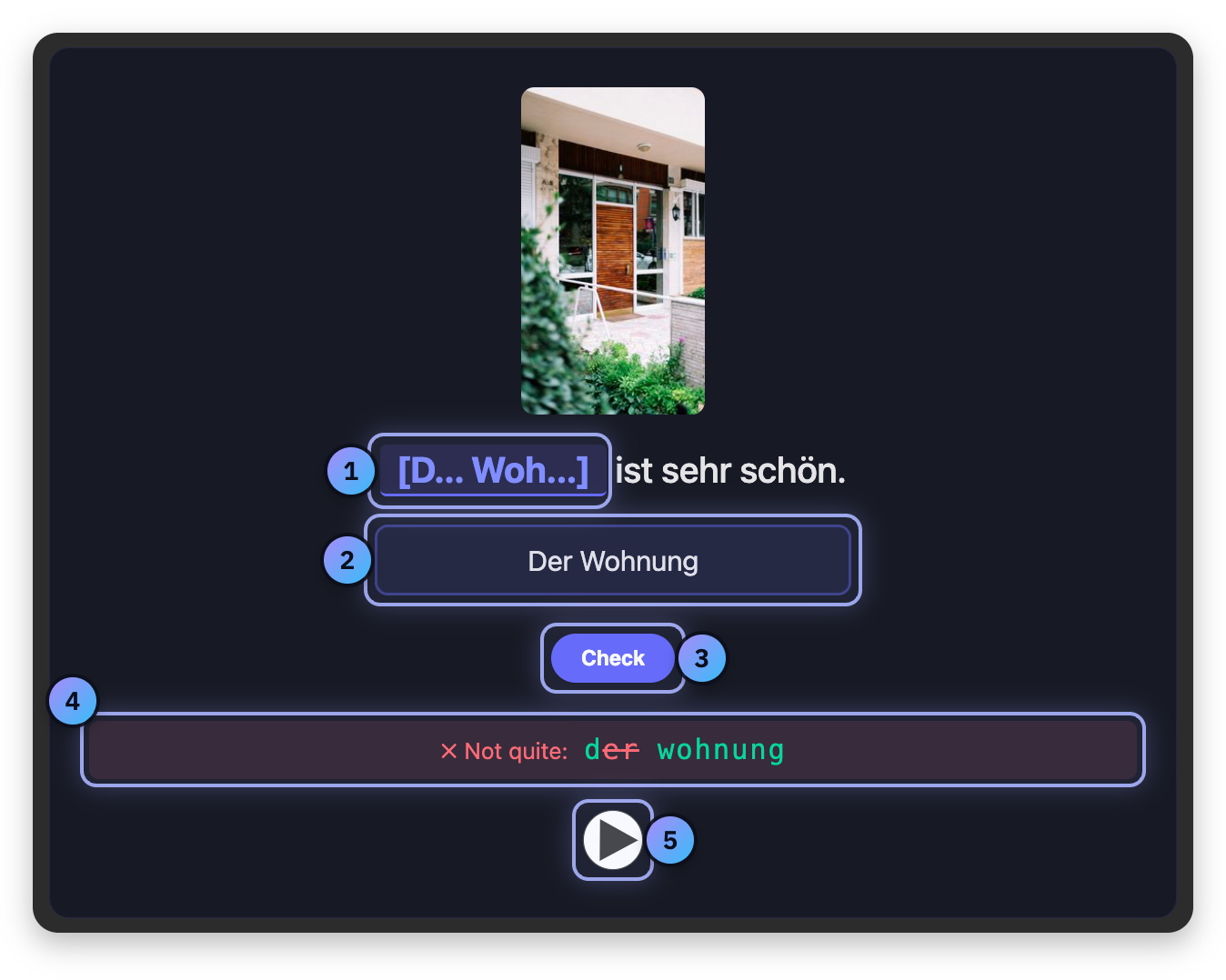
- The gap The missing words, with their first letters as a hint.
- Your answer Type the missing words here.
- Check Checks your answer letter by letter. Enter does the same.
- The result Letters in the right place turn green, the others are struck through, and _ marks letters still missing at the end. Capitals and punctuation do not count. Fix it and check again.
- Sound Reads the sentence with a pause where the gap is.
Show Answer then gives you the whole sentence with its translation and a short grammar hint, and reads the sentence out in full. Almost every word card has a typing card, in the Cloze deck under its own deck.
Getting updates
When cards are improved, you get a new file with a higher number at the end of its name. Import it the same way as the first one. Anki refreshes every card you have not changed, keeps your reviews and due dates, and tells you how many notes it updated. A large number is normal.
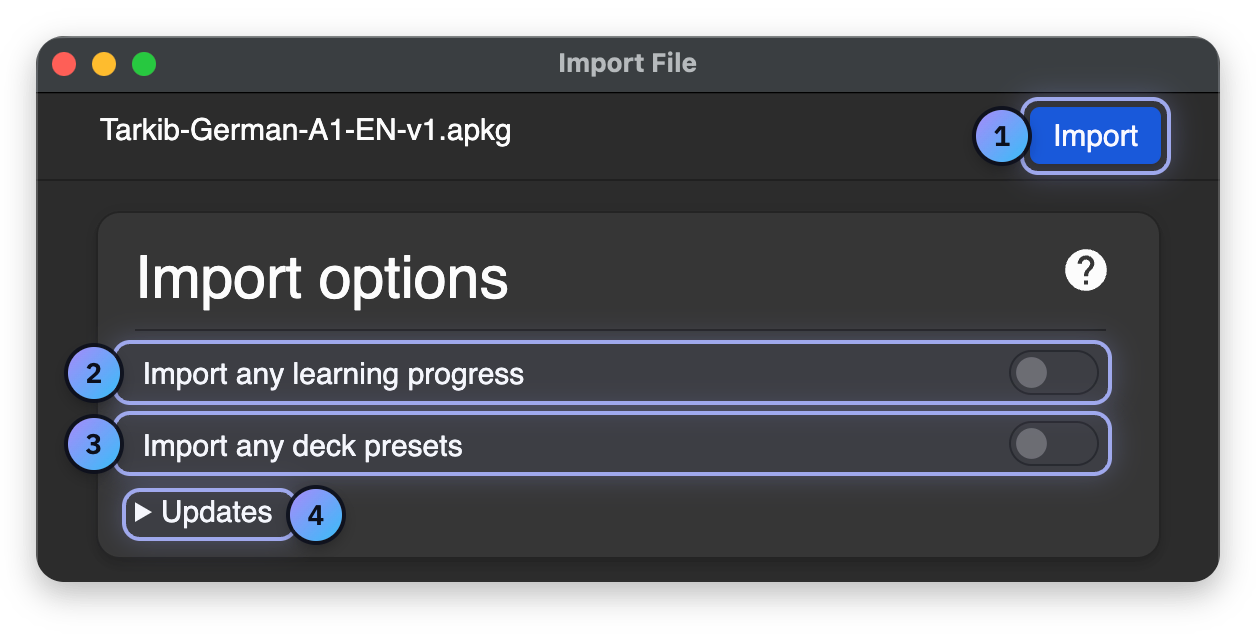
- Import Starts the import.
- Import any learning progress Leave it off. The deck files carry no study progress.
- Import any deck presets Leave it off, so your own study settings stay as they are.
- Updates Leave it closed. You only open it to switch language, explained below.
Switching between English and Arabic
Import the file of the other language, and before you click Import, open Updates and set Update notes to Always. Every card then shows its meanings in the new language and your reviews stay, but your own changes on those cards are replaced. The two files hold the same cards, so a level shows one language at a time: switch as often as you like.
Always matters most on the way back from Arabic to English. Without it, Anki finds nothing newer in the English file and leaves your cards in Arabic.